
AceMoney Studio
AceMoney Studio on your phone and tablet
AceMoney Studio Mobile is coming to the App Store and Google Play, from version 1.2. It is not in the stores yet. This page describes what it will include: what is free, the one-time unlock in the app, and what a phone does differently from a computer. Until it is released, AceMoney Studio runs on macOS, Windows and Linux; see Install AceMoney Studio on a computer.
What will be free on the phone
The download will be free and needs no account. You get 3 accounts you can edit, with the Register, transfers, splits, reconciliation, tags, payees, banks, categories and budgets; the Home dashboard, including its Budget goals and Projected cash flow — next 3 months cards; Reports; scheduled transactions; search; currencies and exchange rates; bill splitting; mileage; bank feeds through SimpleFIN; backups; Document Doctor; and every theme. One portfolio and one goal are included.
Investments are part of the unlock: the Free version shows a panel with an Unlock AceMoney Studio button there. Accounts past the 3 stay visible and are never hidden or deleted, but they are read-only until you unlock, the same rule as on a computer (see The Free version and the AceMoney Studio license).
The unlock
The unlock is a one-time purchase in the app, made through the App Store or Google Play. The price will be on the pricing page. To buy it, once the app is released:
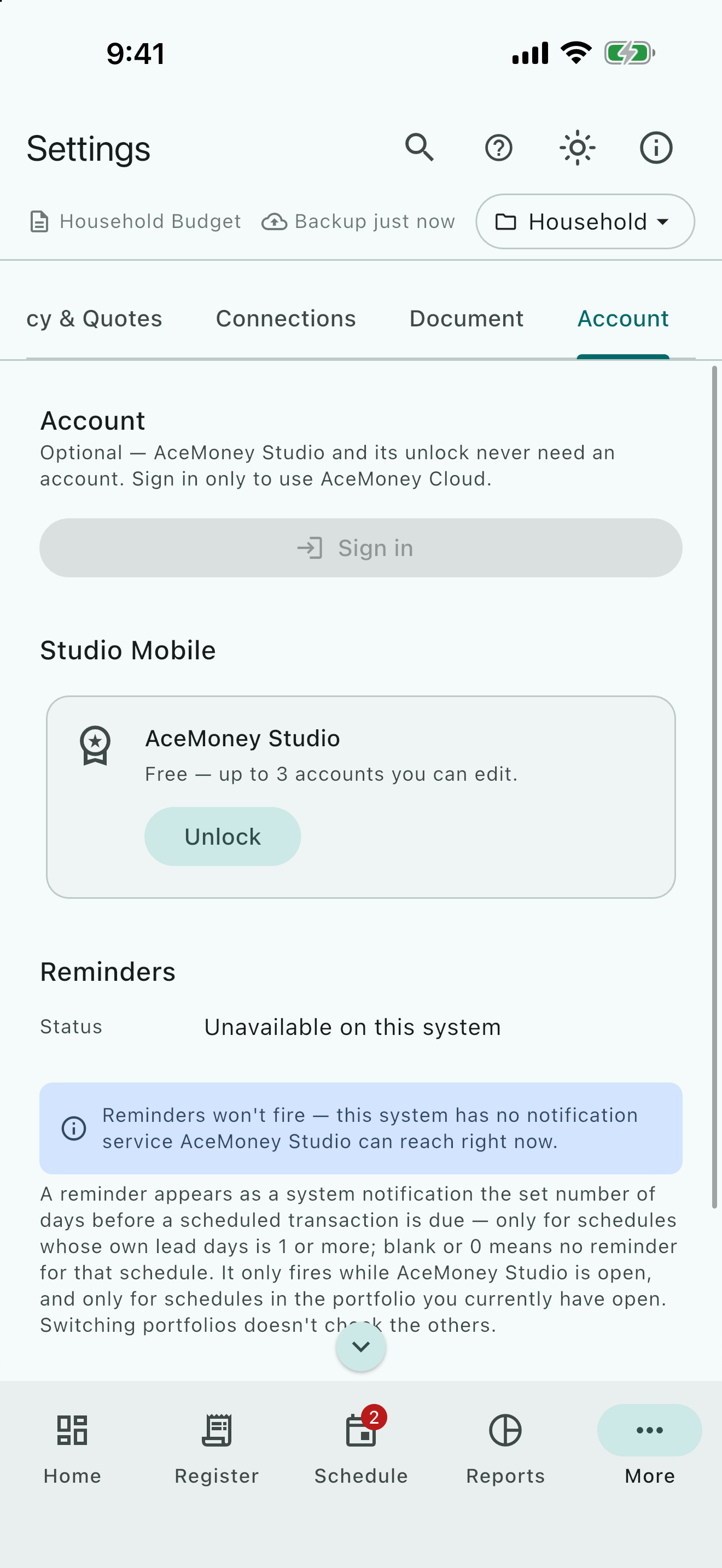
- Open Settings and choose the Account tab.
- Under AceMoney Studio Mobile, the AceMoney Studio card reads Free — up to 3 accounts you can edit. Tap Unlock.
- In the Unlock AceMoney Studio dialog, tap Unlock — followed by the price in your store’s currency.
- Confirm the purchase with the store as usual.
The card then reads Unlocked — unlimited accounts. The same dialog appears when you add a fourth editable account, and when a bank feed would create more accounts than the Free version allows.
The unlock adds unlimited accounts, several portfolios in one document (with the Consolidated scope in Reports), unlimited goals, and Investments. It has no renewal and needs no account. It belongs to the Apple ID or Google account you bought with. It does not include the Mileage plan, and it is not a license for a computer.
Restore the unlock on a new phone
- Sign the new phone into the same Apple ID or Google account you bought with.
- Install AceMoney Studio and open Settings ▸ Account.
- Tap Unlock, then Restore purchases.
If nothing was bought with that store account, the dialog says No previous purchase was found to restore. Restoring the purchase does not copy your data.
The license for computers and the phone unlock are separate
An AceMoney Studio license bought on the website does not unlock the phone app, and the phone unlock does not activate a computer. Neither gives credit towards the other. A purchase made on Android does not carry to an iPhone, because the two stores are separate.
What is different on a phone
- One document. The phone keeps a single built-in document. There is no New Document, Open…, Save a Copy As… or Close Document, and no menu bar.
- The Register shows the last 90 days. Older transactions are not listed there; the running balance and the Balance at the bottom are still exact for the whole account. Home, Accounts, Categories and Reports read your full history.
- No reminders. Scheduled transactions post as on a computer, but the phone shows no reminder notifications.
- No document password. The built-in document cannot be encrypted. Use the phone’s own lock screen to protect it.
- Sharing instead of saving. Exports open the system share sheet; choose Save to Files, a cloud drive or another app. The message Shared confirms.
- A bottom bar on a phone. Held upright, a phone shows Home, Register, Schedule, Reports and More along the bottom; More opens the other pages. On a tablet, or a phone held sideways, the navigation rail runs down the left as on a computer.
- Automatic mileage tracking. The Mileage page has a Tracking tab that computers lack, where Studio can record your drives.
- Settings. Five tabs, with no Software Update: the store updates the app. The Account tab has Sign in for AceMoney Cloud, the AceMoney Studio Mobile card, and Privacy & diagnostics with Share crash & diagnostic reports, off unless you turn it on.
iOS (iPhone and iPad)
When a new document is empty, Import my AceMoney data… on the welcome screen lets you pick a file in Files: an AceMoney Classic file or export, or a bank file. Refunds for the unlock are requested from Apple and decided under Apple’s rules.
Android
Import my AceMoney data… on the welcome screen works the same way. Android’s own backup of app data can include your document if you have it turned on for your Google account. Refunds for the unlock are requested from Google under Google Play’s rules.
Common questions
Can I download AceMoney Studio on my phone today?
Not yet. AceMoney Studio Mobile is coming to the App Store and Google Play, from version 1.2. Today AceMoney Studio runs on macOS, Windows and Linux.
Will the phone sync with my computer?
Yes, with AceMoney Cloud, a separate subscription: sign in on the Account tab with the account that has it. The phone shows a recent window of your data and a computer shows all of it; see What syncs. Without AceMoney Cloud, each device keeps its own document.
Is the unlock a subscription?
No. It is a one-time purchase that belongs to your store account.
Can I get a refund for the unlock?
Refunds are requested from Apple or Google and decided under their rules; MechCAD cannot issue or see them. For a website purchase of a license for computers, see The Free version and the AceMoney Studio license.
Where are my receipts?
Receipts live in AceMoney Receipts; they do not appear in Studio’s Register.
Why can I not see a transaction from four months ago?
The phone’s Register lists the last 90 days. Older rows are listed by Reports ▸ Transactions with the period All Dates. You can still enter a transaction with an older date, and the balances update.
How will I move my Studio data to a new phone?
The unlock follows your store account (Restore purchases), but your document does not follow it by itself. If the document syncs with AceMoney Cloud, signing in on the new phone brings it back. On Android, a backup of app data may bring it with the new phone. Keep the old phone until you have what you need.
Can I lock the app with Face ID, a fingerprint or a PIN?
Not in the app itself. Use your phone’s lock screen; recent iPhone and Android versions can also lock a single app from their own settings.
Troubleshooting
I cannot find AceMoney Studio in the App Store or Google Play. It is not released yet; it is coming from version 1.2.
I paid, but the app still says Free. Open Settings ▸ Account, tap Unlock, then Restore purchases. Make sure the phone is signed into the store account you bought with. A license key for computers does not work on a phone.
“No previous purchase was found to restore.” The store account on this phone has no unlock. Sign into the account you bought with and try again.
“Couldn’t complete the purchase. Try again.” or “Couldn’t restore your purchases. Try again.” The store did not complete the request. Check the connection and any store restrictions (parental controls, payment method), then try again.
“Unlocking isn’t available yet — check back soon.” The app could not load the unlock from the store. Check the connection and try again later.
Some text is cut off on a small phone. Turn the phone sideways, or choose Compact in Settings ▸ Appearance ▸ Display size.
A scheduled reminder never appeared. Reminders are shown on computers only.