
AceMoney Studio
Keep separate books with portfolios
A portfolio in AceMoney Studio is a separate set of books inside one document: your personal finances in one, a small business or a relative’s money in another, each with its own accounts, register, schedule and goals, and a Consolidated view in Reports that adds them all up. Every document starts with one portfolio named Main. Creating a second one needs an AceMoney Studio license; everything about the first is free.
See which portfolio is open
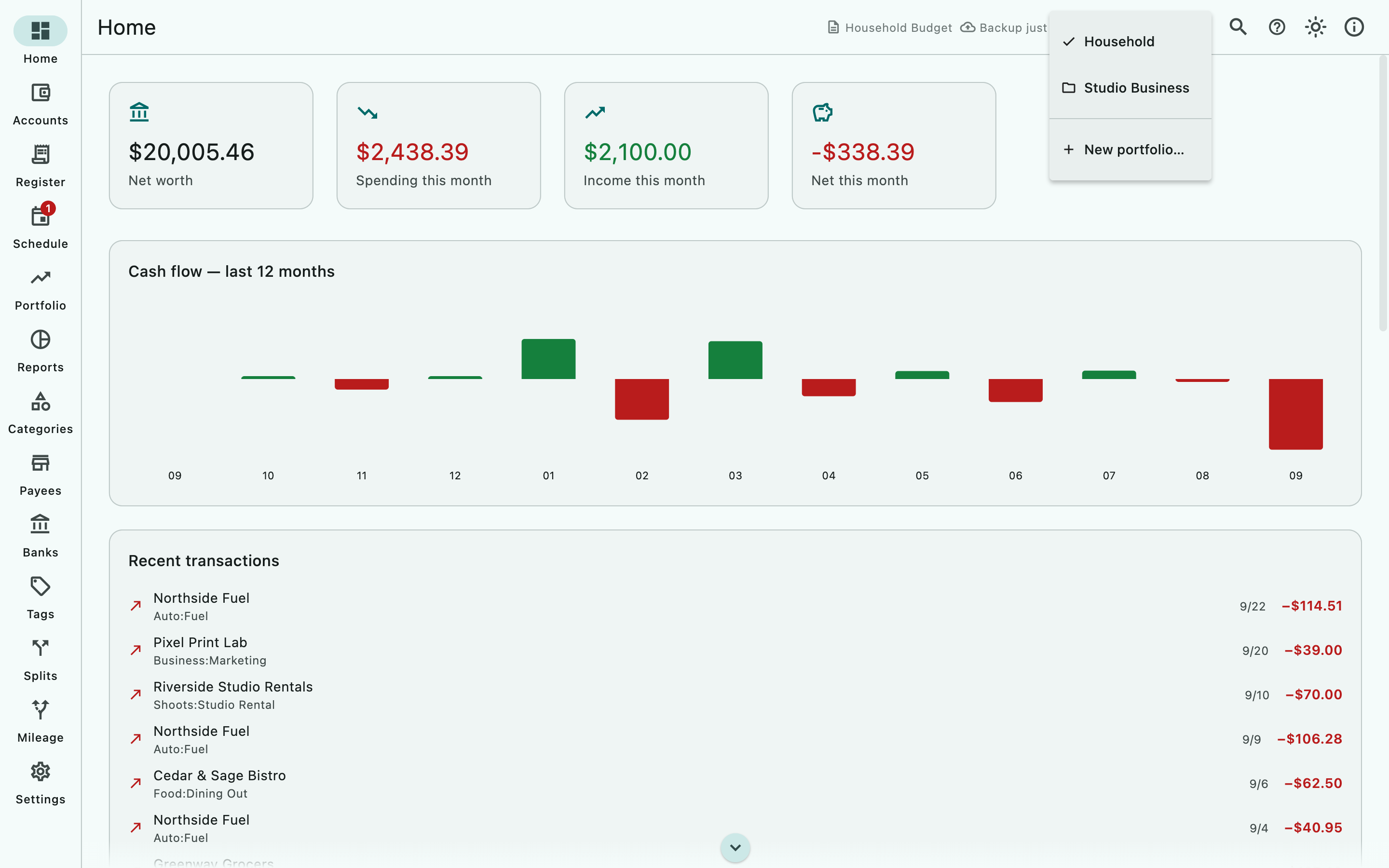
The top bar shows the portfolio. With a single portfolio it reads Portfolio: Main with a small + next to it (New portfolio). With two or more, a pill shows the active name; its tooltip is Switch portfolio.
Create a portfolio
- Choose the + next to Portfolio: Main, or open the portfolio pill and choose New portfolio….
- In the New portfolio dialog enter a Name, for example Studio Business.
- Choose Create. Studio switches to the new, empty portfolio.
On the free version, step 1 shows the dialog Multiple portfolios need the unlocked app: Keep separate books — personal, business, a family member — in one document, with consolidated reporting. Unlock AceMoney Studio to add portfolios. Your data is never changed. Its only button is Maybe later; it does not lead to a purchase.
macOS
To unlock, open Settings ▸ Account, and under Desktop license activate a license bought on the website, then try again. See Free version and license.
Windows
Same as macOS.
Linux
Same as macOS.
iOS (iPhone and iPad)
From version 1.2, in AceMoney Studio Mobile: open Settings ▸ Account and choose Unlock, then try again. The app checks the purchase with the App Store.
Android
From version 1.2, the same as iOS; the app checks the purchase with Google Play.
Switch between portfolios
- Choose the portfolio pill in the top bar.
- Choose a name from the menu; a check mark shows the active one.
Home, Register, Schedule, Goals, Categories and Payees now show that portfolio. The choice is remembered per document.
What belongs to which portfolio
- Accounts belong to exactly one portfolio. The Accounts page lists every account in the document, whichever portfolio is open; Home, the Register’s account picker and Reports (unless Consolidated) use only the active portfolio’s accounts.
- Transfers can only go between accounts in the same portfolio; the Transfer to account list in the transaction form shows only those.
- Scheduled transactions and goals belong to the portfolio they were created in.
- Categories and payees are shared by every portfolio by default. In a document with several portfolios each row shows All portfolios or the portfolio name followed by only, and the Available in button lets you pin one to the active portfolio. Budgets on a category apply wherever the category is available.
- Tags, Banks, currencies, bill splits and mileage are document-wide.
Put accounts into a portfolio
In this version every account you add, import or create from a bank feed is placed in Main, and the Accounts page has no control to move an account into another portfolio. A new portfolio therefore opens on the Home welcome screen and the Register reads No accounts yet — add one in the Accounts section.
Report on all portfolios at once
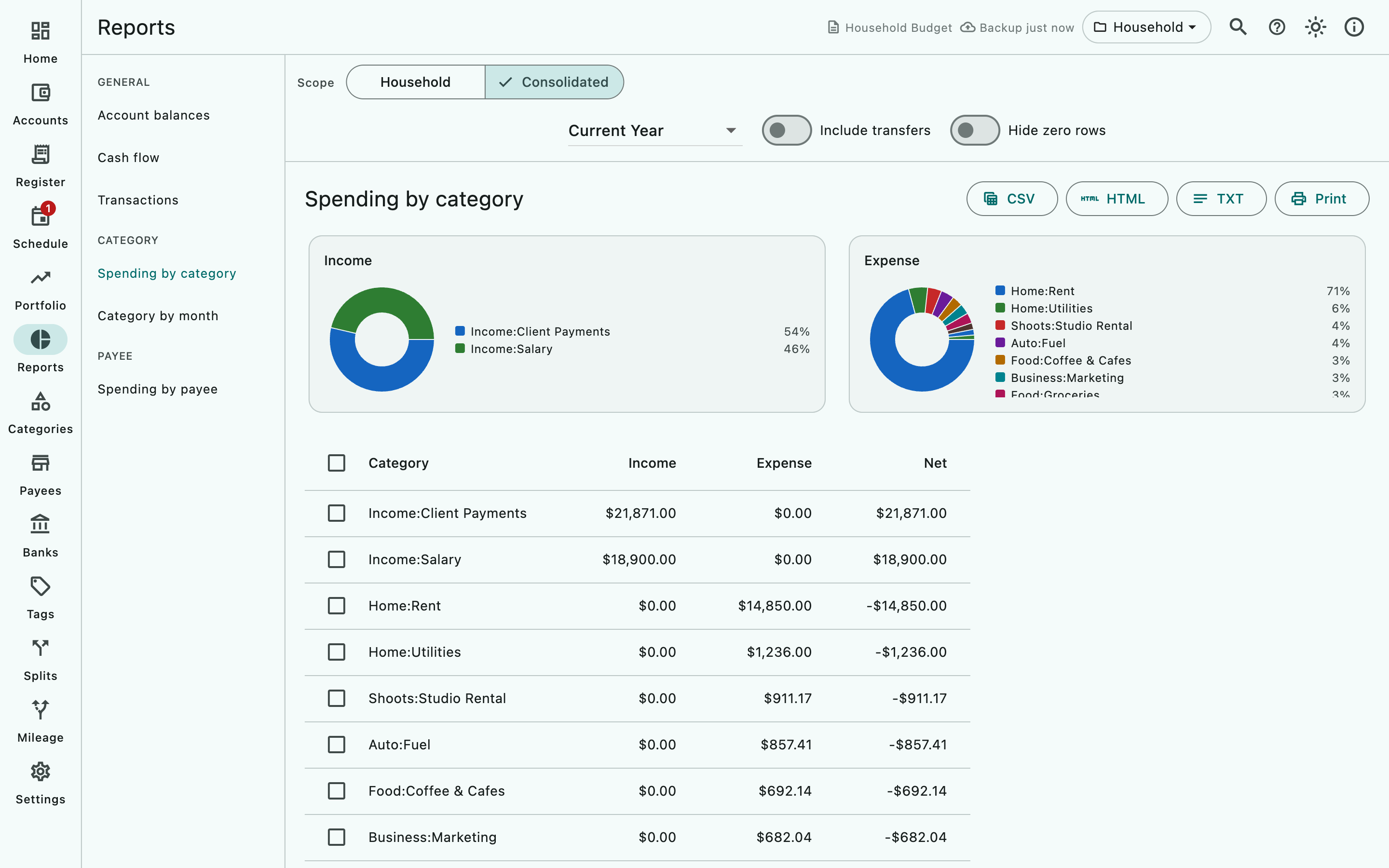
- Open Reports.
- In the Scope control above the filter bar choose Consolidated. The other choice, the active portfolio’s name, returns to one set of books.
The Scope control appears only in documents with two or more portfolios. Home never consolidates; its figures are always for the open portfolio.
Rename or delete a portfolio
Not available in this version. The switcher menu offers the portfolio names and New portfolio… only. Choose a name carefully when you create one.
Common questions
Do I need a license to open a document that already has several portfolios?
No. Only creating a new portfolio is gated. A document with several portfolios opens and switches normally on the free version, and nothing in it is deleted. As everywhere on the free version, only three accounts can be edited and the others are read-only, and Investments need the license.
What is the difference between a portfolio and a document?
A document is the file that holds everything: on a computer you can have several and open one at a time; the phone app (from version 1.2) has one built-in document. Portfolios are separate books inside one document, sharing its categories, payees, tags and banks and reporting together with Consolidated. Use two documents when nothing should be shared at all.
Are categories and budgets shared?
By default yes: a category exists in every portfolio and is marked All portfolios. Use Available in on the Categories page to keep a category in one portfolio only.
Can I transfer money between portfolios?
No. A transfer needs both accounts in the same portfolio. Record a withdrawal in one portfolio and a deposit in the other. Document Doctor flags any transfer that ends up spanning two portfolios.
Do reminders fire for every portfolio?
No. Desktop reminders are checked only for the portfolio that is open in the app.
Why does the Accounts page show accounts that Home does not?
The Accounts page lists every account in the document; Home, the Register and Reports use the active portfolio only. Switch portfolios to see the others on Home.
Is a portfolio the same as the Portfolio page?
No. The Portfolio page in the navigation rail is your investments (holdings, quotes, buys and sells). The portfolio switcher in the top bar picks a set of books.
Troubleshooting
“Multiple portfolios need the unlocked app” appears and offers no way to buy. That dialog only closes. Open Settings ▸ Account to activate an AceMoney Studio license, then create the portfolio again.
Home shows “Welcome to AceMoney Studio” although I have accounts. You switched to a portfolio with no accounts. Switch back with the pill in the top bar.
The Register says “No accounts yet — add one in the Accounts section.” The active portfolio has no accounts. See Put accounts into a portfolio above.
Net worth changed after I switched portfolios. Expected: Home shows one portfolio at a time. Use Consolidated in Reports for the total.
There is no Scope control in Reports. The document has one portfolio; the control appears with the second.
A category is missing in one portfolio. It was pinned with Available in to another portfolio. Open Categories in that portfolio and set it to All portfolios.
A transfer’s other side is missing. The destination account is in another portfolio. Run Settings ▸ Document ▸ Check document… and follow the finding.