
AceMoney Studio
Set savings and debt-payoff goals
A goal in AceMoney Studio is a target tied to one of your accounts: save up to an amount in a savings account, or pay a credit card or loan down to zero. Studio reads the account’s live balance and shows how far along you are; it never moves money. One goal is included in the free version; more need an AceMoney Studio license on your computer (or, from AceMoney Studio Mobile 1.2, the unlock in the phone app).
Before you begin
- Add the account the goal will follow (see Accounts). A savings goal usually follows a savings account; a debt-payoff goal follows a credit card or loan account whose balance is negative while you owe money.
Open the Goals page
Goals do not have an entry in the navigation rail. From Home, choose the + icon on the Goals card (its tooltip is Add goal) or tap anywhere on the card. The Goals page opens with an Add goal button; when you have none it says No goals yet and Set a savings target or a debt-payoff goal, linked to one of your accounts.
Add a savings goal
- On the Goals page choose Add goal.
- Enter a Goal name, for example Emergency fund.
- Leave Goal type on Savings target.
- Pick the Account to follow.
- Enter the Target amount (saving toward).
- Optionally choose Pick date to set a target date; the row then reads Target: followed by the date, and the X clears it.
- Choose Add.
Progress is the account’s current balance divided by the target amount. Money you deposit into that account moves the bar. For an investment account the balance is its cash plus the value of its holdings, so a price change moves the bar too (see Which balance does a goal use? below).
Add a debt-payoff goal
- Choose Add goal.
- Enter a Goal name, for example Clear the credit card.
- Set Goal type to Debt payoff.
- Pick the credit-card or loan Account.
- Enter the Starting balance owed as a positive number, the amount you owe today.
- Optionally Pick date for the day you want to be debt-free.
- Choose Add.
Studio stores a credit-card or loan balance as a negative number while you owe money, so the goal measures how much of the starting balance has been paid down. When the account reaches zero the goal is 100%.
Track your progress
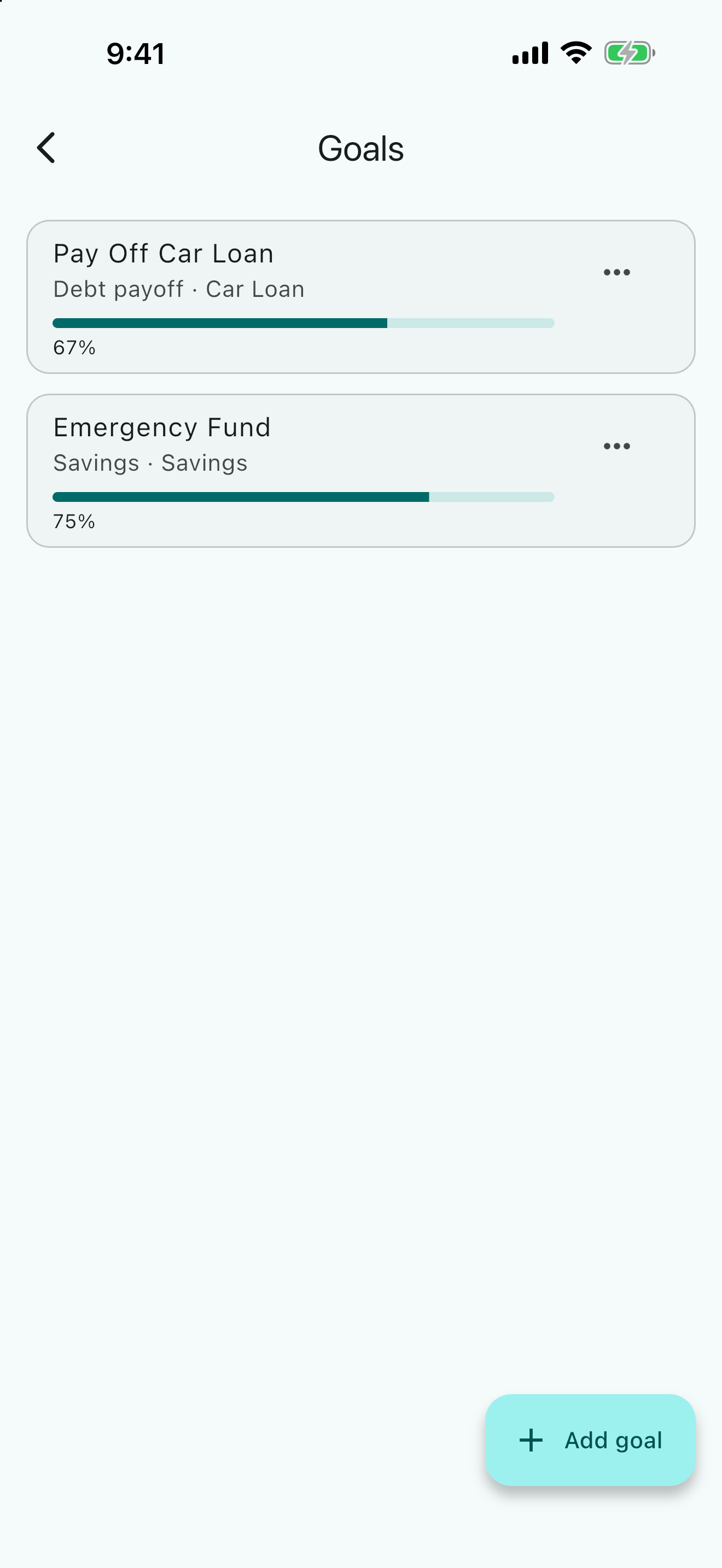
Each goal tile shows the name, Savings · or Debt payoff · followed by the account, a progress bar and the percentage. Two notes can follow the percentage: · Achieved in green once the target is met, and · Behind schedule in red when the target date has passed and the goal is not met; · by with the date appears when a target date is set. The Goals card on Home repeats up to three goals with the same bars.
Edit or delete a goal
- Choose the menu on the goal tile.
- Choose Edit to change the name, account, amount or date, then Save. The Goal type is locked once a goal exists; to switch between savings and debt payoff, delete the goal and add it again.
- Choose Delete to remove the goal. There is no confirmation and no undo, but only the goal is removed; the account and its transactions are never touched.
How many goals are free
The free version includes one goal in the portfolio you have open (a free document has one portfolio, so one goal). Choosing Add on a second goal opens the Unlock AceMoney Studio dialog. Editing or deleting goals is never blocked.
macOS
The dialog offers Enter a license key… (which opens Settings ▸ Account so you can activate an AceMoney Studio license you bought on the website), Buy AceMoney Studio (which opens the website) and Not now. Prices are on the pricing page.
Windows
Same as macOS.
Linux
Same as macOS.
iOS (iPhone and iPad)
AceMoney Studio Mobile is coming to iPhone and Android; from AceMoney Studio Mobile 1.2 the dialog offers Unlock with the store price, Restore purchases if you unlocked the app before, and Not now. The app checks your purchase with the App Store.
Android
From AceMoney Studio Mobile 1.2, the same as iOS, with Unlock, Restore purchases and Not now; the app checks your purchase with Google Play.
Common questions
Which balance does a goal use?
The account’s balance, the same figure the Accounts page shows: opening balance plus every transaction. For an investment account, a savings goal counts the cash plus the value of the holdings at the latest price (while Add investment value to account balances is on in Settings ▸ Currency & Quotes, the default); a debt-payoff goal counts the cash only. The balance is read live every time the page opens, so a goal is never out of date and never needs updating by hand.
Can one goal follow several accounts?
No. A goal follows exactly one account. If your savings are spread over two accounts, either move them into one or create a goal per account (the second goal needs the unlocked app).
Does a goal move or reserve money?
No. A goal is a measurement. It does not create transactions, hold back a balance or schedule transfers. Use scheduled transactions to automate the deposits themselves.
What happens when the target date passes?
Nothing changes in your accounts. The tile shows · Behind schedule in red until the goal is met, and then · Achieved in green. Edit the goal to push the date out if you like.
Do goals count toward the free three-account limit?
No. Goals and accounts are counted separately: three accounts and one goal are free.
Are goals shared between portfolios?
No. Each goal belongs to the portfolio you were in when you added it, because it follows an account in that portfolio. Switch portfolios with the control in the top bar to see the other set.
Is my goal stored anywhere online?
Goals live in your document. If the document syncs with AceMoney Cloud, they are on your other computers too, encrypted like the rest of it.
Troubleshooting
“Name is required.”, “Choose an account.” or “Target amount must be a positive number.” Fill the missing field. The amount must be greater than zero even for debt payoff (enter what you owe as a positive number).
A debt-payoff goal stays at 0% although I have been paying. Check the account’s balance on the Accounts page: it should be negative while you owe money and move toward zero as you pay. If the balance is positive, the opening balance was entered with the wrong sign; edit the account.
A savings goal shows more than 100%. The account holds more than the target. The goal reads · Achieved; raise the target or leave it.
The goal I added is gone. You are in a different portfolio. Switch back in the top bar.
“Unlock AceMoney Studio” appeared when I tried to add a goal. You already have the one goal the free version includes. Activate an AceMoney Studio license on your computer, or delete the existing goal first.
“Couldn’t save this goal. Try again.” The document could not be written. Try again; if it repeats, run Settings ▸ Document ▸ Check document….